Read Latex

Showing posts with label ham radio. Show all posts

Wednesday, November 16, 2011

Scaling Laws for Fractal Antennas


I was doing some simulations of fractal antennas recently and a friend said, "I'm talking about the postage sized antenna for 160 meters."


The statement intrigued me for several reasons:
1) Perhaps fractal antennas scale differently because of fractal dimension?
2) How small would could an antenna for 160 meters (1.9 Mhz) REALLY be?
3) How does fractal dimension affect the performance of the antenna?


Analysis Tools


The questions were answered via extensive analysis. Analysis was performed using 4NEC2 an excellent adaption by Arie Voors of the Numerical Electromagnetics Code by J, Burke and A. Poggio. These links will open in a new window if you would like to check them out. Arie Voors has made his tool freely available to the technical community. The Minkowski Antenna configuration used in this study is described here by Camps-Raga and Islam at the University of Missouri, Columbia. The 'C' program minkowski.c, the bash script, doit.bash, and the parameter file, tail.txt used to generate the antenna examples are included at the bottom of this technical note.


Simulation Results


1) A fractal antenna of a given configuration and dimension scales
    linearly in wavelength just like all antennas do.
2) A Minkowski fractal antenna for 160 meters would be 36 feet wide.
    It would have a gain of -19.3 dB relative to an isotropic radiator.

3) Increasing fractal dimension decreases antenna size with
    gain dropping faster than size.


Discussion


1) A fourfold reduction in antenna size is accompanied by a gain reduction of 21.3 dB so there appears to be is a severe penalty for size reduction. My current hypothesis is that as fractal dimension increases, the antenna starts to look more like a mirror than an absorber of electromagnetic energy.
2) A level 0 Minkowski fractal is a square loop antenna! The makes a nice basis for comparison.


Analysis Details


'C' Code Used to Generate the Minkowski Fractal Antennas


The 'C' code was written entirely by the author using the principle of segmenting a single line and offsetting the middle segment by a distance h. The code was compiled using the cygwin cc compiler from the fantastic and free cygwin running on top of Windows XP on a dual core Intel processor and ASUS motherboard from newegg.com. If you have never had the pleasure of building your own computer from off the shelf components I urge you to do so. You will save a ton of money and get a computer more suited to your needs. Anyway, here is the 'C' code:


------- cut here -------
// Minkowski fractal antenna generator by van at wdv dot com

#include
#define SOUTH 1
#define EAST 2
#define NORTH 3
#define WEST 4
#define MAX(a,b) ((a)>(b)?a:b)


int maxLevel = 1;


void edge(double xA, double yA, double xF, double yF, int type, int level)
{
    double W = 1.0 / 3.0;
    double H = 1.0 / 3.2;
    double L, w, h;
    double xB, yB;
    double xC, yC;
    double xD, yD;
    double xE, yE;


    if(level >= maxLevel)
    {
        printf("1\t0\t%9.4f\t%9.4f\t0\t%9.4f\t%9.4f\t1.e-4\n",
            xA, yA + 1, xF, yF + 1);
    }
    else
    {
        if(type == SOUTH)
        {
            L = xF - xA; w = L * W; h = L * H;


            xB = xA + w; yB = yA + 0;
            xC = xA + w; yC = yA + h;
            xD = xF - w; yD = yA + h;
            xE = xF - w; yE = yA + 0;


            edge(xA, yA, xB, yB, SOUTH, level + 1);
            edge(xB, yB, xC, yC,  WEST, level + 1);
            edge(xC, yC, xD, yD, SOUTH, level + 1);
            edge(xD, yD, xE, yE,  EAST, level + 1);
            edge(xE, yE, xF, yF, SOUTH, level + 1);
        }
        else if(type == EAST)
        {
            L = yF - yA; w = L * W; h = L * H;


            xB = xA + 0; yB = yA + w;
            xC = xA - h; yC = yA + w;
            xD = xA - h; yD = yF - w;
            xE = xA + 0; yE = yF - w;


            edge(xA, yA, xB, yB,  EAST, level + 1);
            edge(xB, yB, xC, yC, NORTH, level + 1);
            edge(xC, yC, xD, yD,  EAST, level + 1);
            edge(xD, yD, xE, yE, SOUTH, level + 1);
            edge(xE, yE, xF, yF,  EAST, level + 1);
        }
        else if(type == NORTH)
        {
            L = xA - xF; w = L * W; h = L * H;

            xB = xA - w; yB = yA + 0;
            xC = xA - w; yC = yA - h;
            xD = xF + w; yD = yA - h;
            xE = xF + w; yE = yA + 0;

            edge(xA, yA, xB, yB, NORTH, level + 1);
            edge(xB, yB, xC, yC,  EAST, level + 1);
            edge(xC, yC, xD, yD, NORTH, level + 1);
            edge(xD, yD, xE, yE,  WEST, level + 1);
            edge(xE, yE, xF, yF, NORTH, level + 1);
        }
        else if(type == WEST)
        {
            L = yA - yF; w = L * W; h = L * H;

            xB = xA - 0; yB = yA - w;
            xC = xA + h; yC = yA - w;
            xD = xA + h; yD = yF + w;
            xE = xA - 0; yE = yF + w;

            edge(xA, yA, xB, yB,  WEST, level + 1);
            edge(xB, yB, xC, yC, SOUTH, level + 1);
            edge(xC, yC, xD, yD,  WEST, level + 1);
            edge(xD, yD, xE, yE, NORTH, level + 1);
            edge(xE, yE, xF, yF,  WEST, level + 1);
        }
    }
}

main(int argc, char **argv)
{
    if(argc > 1) maxLevel = atoi(argv[1]);

    edge( 0,  0, 16,  0, SOUTH,  0);
    edge(16,  0, 16, 16,  EAST,  0);
    edge(16, 16,  0, 16, NORTH,  0);
    edge( 0, 16,  0,  0,  WEST,  0);
}


Bash Script Used to Generate the Minkowski Fractal Antennas


The 'C' program above, though somewhat minimal, produces extra copies of the segments during the recursion. The output lines are only part of the "card entry" fragments necessary for 4NEC2. To get the output file into a form usable by 4NEC2 the following script was run:


$doit.bash 2


which produces a level 2 Minkowski fractal antenna.


------- cut here --------------


#!/bin/bash
minkowski.exe $1 | sort -u | nl | sed -e 's/ //g' | sed -e 's/^/GW\t/' > head.txt
cat head.txt | wc -l > /tmp/tmp.txt
lineCount=`cat /tmp/tmp.txt`
echo $lineCount
sedCommand="s/NSEG/$lineCount/"
echo $sedCommand
cat tail.txt | sed -e "$sedCommand" > foo.txt
cat head.txt foo.txt > MI3ALVW.nec
u2d MI3ALVW.nec


~                       

The Last File


The last file "tail.txt" is used by the bash script to provide analysis parameters for 4NEC2. It looks like this:


------- cut here ----------


GE  0
EK
LD  5   0   0   0   5.74713e7   0
EX  6   NSEG    1   0   1   0
GN  2   0   0   0   13  0.005
FR  0   1   0   0   1.8 0


Addendum:
"Chip" W1YW owns US patents 6452553 and 7256751 on fractal antennas. He has measured the performance of a configuration similar to the one pictured at 175 MHz and does not report the dip in gain that appears in the 1.9 MHz version above. He states and I quote:


"For example,the MI2 (second iteration)  modeled in NEC4, reveals a 97% efficiency and dipole equivalent gain. Recently an open house with members of the Radio Club of America showed this to: K1VR; WB2MGP; K1BG; WA6RNU; W0BIW; KD0FAA; and several others. In addition, the visitors were treated to actual chamber measurements of a wire-bent MI2 at 175 MHz, Its gain was indisitinguishable (within 0.2dB) from an ETS calibrated dipole of 1.7 dBi. The fractal antenna is thus unity gain to a dipole."


Thus W1YW does not observe the same drop in gain that occur in my simulations. Work is proceeding to rectify this discrepancy.


Sunday, March 28, 2010

Dark Flow and a Soft Radio Network


To the dark matter and dark energy mysteries, we can now add dark flow...

NASA’s Sasha Kashlinsky discovered a twenty degree patch of sky between Centaurus and Vela to which 700 X-ray clusters are being pulled at 611 miles per second. The significance of this is that it contradicts predictions that large-scale motion should show no preferred direction and that the motions should decrease at ever increasing distances. Kashlinsky posits that the source of the pull is "outside the currently observable universe".

I mention this because this gives us a patch of sky to which we can point our software-defined radios and perhaps observe something interesting.


The limitation is that our radios have to either be space-borne or in the Southern Hemisphere to get in on the action. Also this "dark flow' patch occurs out of the range of the Ukrainian radio telescope data visualized in a previous post:


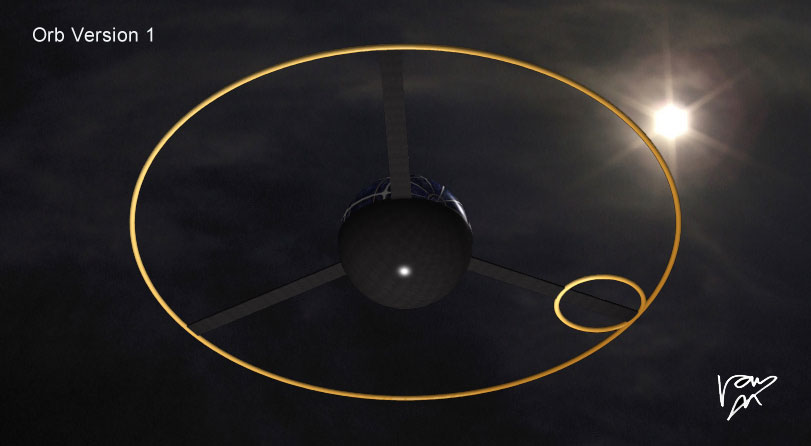
It is my hope to create a network of Orbs - Soft Radios that can cooperate to locate celestial signals. Orbs are wide-band radios that downlink to the web using TCP/IP 802.11 protocols. Orbs talk to each other to using ham, astronomy, and ISM bands in real time. Their locations in space time is computed using GPS-disciplined internal oscillators.


Sunday, September 13, 2009

Hamtrak - Excerpt from Work In Progress


Added the ability to annotate RF sources streamed from data capture.

Tuesday, August 18, 2009

A Fence In Space...


For the past couple of days I have been listening to satellite crossings from the Kickapoo Space Radar. NAVSPASUR is part of the North American “Fence” that operates along the a great circle fan crossing the US. The "post" in Kickapoo is at latitude 33.558, the second tack to the left of my home in Little Rock (the red tack). One can listen to objects crossing the radio fence using Stan Nelson’s station in Roswell, New Mexico. The broadcast is in real time.

For a real treat, the NASA Java Applet JTRACK-3D allows one to view which of 900+ satellites are in crossing the fence at any given time.


When a space borne object crosses the fence it chirps. With practice one can distinguish satellites from meteors. An audio chirp and no satellite, means a meteor or a satellite crossed that isn’t in the public database. I heard two while writing this sentence. Notice that the four platforms above all have orbital periods of around 100 minutes.

Platforms which cut obliquely like ORBCOMM FM 36 have a different audio signature than those with highly inclined polar orbits due to their longer dwell time in the RF swath. To some degree the chirps are unique and I wonder if a blind person could actually get to where they knew the satellite by its chirp. Locals will be happy to know that there is a “post” in the space fence at Red River Space Surveillance Station, AR, near Texarkana.


Monday, June 29, 2009

An Excerpt from Ham Radio Field Day 2009

Because of an exhausting 50 mile bike ride in the hot sun, I couldn't make it to Field Day on Saturday. I woke up late on Sunday, hoping to make some kind of belated appearance.

Just for fun, I started my HamTrack system at 9:47 am - a mashup of Google Earth, CW Skimmer, and C++ programs, glued together with some Unix tools, sed, grep, awk, along with the usual database fiddling and geolocating.

It is an end-to-end automated signal tracking system that translates RF morse code into pins on a map. So I left it running and headed over to the real Field Day, where, after catching up with my buds, I managed an impressive 2 contacts 15 minutes before the end of the event at 1 PM.

When I got home I discovered that 308 stations made 917 calls while I was gone, illustrated as pins in a map below. As in the 24 hour case, (previous blog), pins are colored by frequency, red for 6.9 MHz, blue for 7.1 MHz and spectral coloring in-between. My pin AE5CC is arbitrarily assigned red so I can find it in the sea of pins.

You will need the Google Earth browser plug-in to view the interactive map, and it takes a few seconds to load the data - about the time it takes to read this. If you don't use Google Earth, you're missing the best thing since sliced bread. - AE5CC


Tuesday, July 08, 2008

PC Security Checklist


As more activities migrate to personal computers, system security becomes a greater concern. Threats to PC security include viruses, Trojans, worms, phishing schemes, buried processes and distracting scams. This note is Wintel-centric but applies to Mac and Linux boxes as well. This note addresses five categories of personal computing security.

A) Physical and Site Security - Routers and Locks

The web connection coming into your house is just another sewer pipe. Treat it accordingly. Use a router, lock it down.

1) Avoid connecting your DSL or cable modem directly to your computer. Instead,isolate your IP address by placing a router between you and the outside world. This also gives you additional ports that you can control access to and from. A router makes it difficult for an outsider to see your IP address (your internet phone number) or your MAC address (your hardware unique identifiers).

2) Install your router where you can see it. Control physical access to it.

3) Change your router name and password to something besides admin, admin.

4) Change your router IP address to something other than 192,168.1.1. Your browser will remember the new address. The router address can be reset by rebooting your router, but not without physical access.

5) The internet is NOT ham radio. Goodwill, Character and Integrity do not apply as in the licensed arts. Use 128-bit WEP or better encryption. Any device that connects to my router (the internet equivalent of a repeater) must have permission.

B) Soft Security - Anti-virus Software

You can do everything right and still get infected.

1) Install good anti-virus software. I currently use McAfee because it comes free with my Scottrade account and I can run three legal copies of it on other computers in the household. I have used Norton, but it costs too much, expires frequently and hogs system resources. I really like the free AVG software. It is excellent and they don't try to elbow out everything else. Computer Associates gives you a free trial and then makes uninstalling a total nightmare. This goes for several other packages. If a vendor doesn't provide a clean uninstaller, don't use them, because THEY are a virus.

2) Use firewall software. Insert exceptions for required sites and services like Echolink.

C) Email Security

Scan inbound and outbound email and attachments using anti-virus software.
1) Don't open attachments from people you don't know.

2) Google gmail allows you to report items as spam. Use it.

3) Report fraud and phishing emails to their respective agencies including the ISP, Paypal, Ebay, FBI and Attorney General. Some ebay frauds have been really authentic looking. Check for spoof URL's before responding.

4) Keep a primary email account, and route all other email accounts to and
from it. This is for convenience as much as security.

D) Browser Security - Plug-ins and Spyware

Try Firefox 3.0 or later. It is multi-platform, open source, and accountable.

1) McAfee red lights troublesome web destinations, including bad ham radio destinations which are rare. I average 490 searches a month so this is quite handy. Other products also do this. Do not let anyone or anything obstruct your access to good information.

2) Don't use products (e.g. Real Video) that monopolize services such as video display and attempt to be the end all. If you give them your name and address you will get on "some list". Some lists go everywhere. Some programs will leave background processes running to report back to the mother ship. Besides invading your privacy these make browsing and computing slow.. AT&T Yahoo DSL is notorious about filling your PC with wasteful market-driven processes. They have destroyed the quality of many a newcomer's experience by marketing them to death. Too many choices.

3) Use Google Safe Search to avoid sites that are a frequent source of viruses. Your computer will get sick. It's karma.

4) Use Microsoft AntiSpyware. Forced by their own losses to develop this product, it works and its free. It is fairly lightweight, process-wise. Enable the auto-download, but require them to ask permission to install. Keep track of what they are adding or subtracting from your computer. Their track record requires them to be supervised.

5) Avoid illegal download sites for music, videos, or software. Your computer will get sick. More karma. Why steal? You will have to make a list like Earl.

E) Kid Security

"Little eyes, watch what you see..."

1) Put kid computers in a public place like the kitchen.

2) Check your kids browser history, chat, IM, Skype, often.

3) Facebook trumps myspace, but not by much. Check online friends and memberships often.

Conclusion

We live in the age of hot and cold running knowledge. Anything that obstructs access to this knowledge is a loss of freedom.

We also live in the wild west of the information age. Forewarned is forearmed.


L. Van Warren - AE5CC

Wednesday, April 09, 2008

Antenna Gain


Gain patterns can be drawn for microphones, radio antennas and light reflecting from surfaces. They are both informative and beautiful.
The following images show the gain of a certain "wideband" herringbone antenna as frequency increases. Gain is simply the sensitivity of the antenna to a signal in a given direction.

When you tune a radio, you are selecting which frequency you want to listen to. But your antenna has to be cooperating by being sensitive to both the frequency of that station, its location, and how the signal bounces off the sky, land, water, trees, mountains and buildings.

So to begin we tune to 1.0 megahertz on our radio dial. In the pictures that follow we will increase the frequency on our radio dial by a factor of ten with each click. That makes for pretty big jumps. I hope to animate the in-between's soon. There are
so many variables one must decide what to show first. In the meantime here is a keyframe warm-up starting at the promised 1 MHz. Captions are below the images.

You Say Tomato
1 MHz - Radially symmetric pattern, more gain at top than bottom.

I Say Potato

10 MHz -More gain at the ends than the middle.


The Edges of Lambda

100 MHz -Nature is more beautiful than I can imagine.


Butterfly Spectacular

1000 MHz -Think about this next time you tune a radio.

The last picture is around the frequency of cellphones and some cordless phones. But their antennas actually have blobby radiation patterns like the first example. Can you think why that might be so?


Monday, April 16, 2007

My Favorite Radio


-- photo courtesy Universal Radio

This is my favorite radio ever. It is the Hammarlund HQ-140-X shortwave receiver. It was made between 1953 and 1955, one year before I was born. When I was about thirteen I received one of these radios as part of my ham-radio pursuits of the time.

I remember listening to Canadian, South American, English and European broadcasts on it late at night when the reception, "on the skip" was good due to ionospheric conditions. I heard Al Green on the AM, telegraph coding, both manual and automated and strange warbling signals that are quite memorable. I have always wondered if these were pulsars or binary stars, but perhaps that is a bit fanciful.