
Added the ability to annotate RF sources streamed from data capture.
 (click images to enlarge)


Lately as I ride across the pedestrian bridge at sunrise, I have noticed the sun has been rising in the north. Having been informed that the always rises in the east, I found this perplexing. The trouble turns out to be the accumulation of two interesting factors.
1) The pedestrian bridge does not head due north, it is rotated 15 degrees towards the east. Picture:

So believing the bridge to be north-south was problem one.
2) The sun does not rise in the east. Tomorrow (9/4/2009) it rises exactly 9 degrees north of east. But back in July when I was first having the problem, it was rising 28 degrees north of east. As late as August 4, it was 21.4 degrees north of east. Moreover just before sunup, the sun is another couple of degrees north of east, when its light is beginning to fan out across the sky.
3) Accounting for the early light makes 30 degrees north + 15 degrees of bridge rotation, so the sun APPEARS to be rising at 45 degrees north of due east and that surely looked wrong. I noted this out fearing some sort of cosmological malfunction of my brain or dire state of misinformedness.
4) The sun does not rise in the east, it rises in the north east, in the summer and the south east in the winter. This is paradoxical since the winter sun rides lower in the southern sky as the northern hemisphere tilts further away from it. It rises in the east only one day of the year. This year that will be September 23 at 7 am CDT, a day after the equinox. After this the sun heads south of east for its rising reaching a of maximum southness of east of 28.6 degrees around the solstice, December 21.
5) Riding on the bridge, the sun will appear to rise in the east on Halloween morning at 7:15 am in a suitable tribute to my distress. The next day we reset our clocks introducing a new kind of biological confusion.
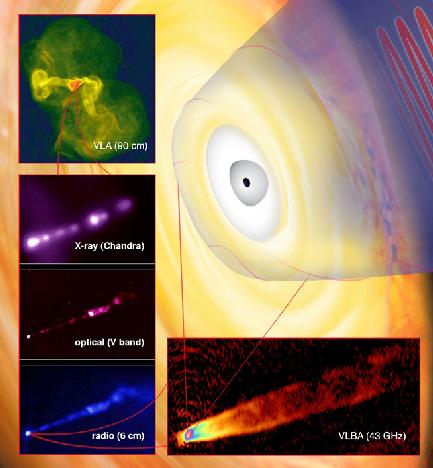
 But for the first time I had a possible name for bright source GR1228... could it be M87?!
 I needed to make sure that G1228 was M87, so I did some calculations and found a discrepancy between the M87's position in Google Sky and its position in the Ukrainian radio telescope database:


 One can listen to objects crossing the radio fence using Stan Nelson’s station in Roswell, New Mexico. The broadcast is in real time.


If an object enters at a shallow angle, it can skip off the atmosphere, much as a rock skips along a lake. It will often go back into orbit and reentry again, but at a slightly steeper angle until it encounters the fate of the first group. If it is going escape velocity, it can skip and then just go back out into another orbit, but this is not the most likely scenario.
When an object enters at an angle of between 2 and 8 degrees (give or take) it undergoes a smooth and controlled reentry, pulling only a few gees. All objects that encounter the atmosphere create a boundary layer of ionized gas. This does several things. First, it attempts to melt the skin of the object. Second it reflects RF internally. Third, and most importantly for us, the layer of ionized gas creates a streak in the sky that is an effective RF reflector. Because of the conical shape of this streak of ionized gas, the reflector does not reflect the same in all directions, the fancy word for this is anisotropic. It polarizes the RF, favoring some orientations and frequencies over others, just as your Polaroid sunglasses do.

Because this reflector is not the same size in all directions, it will favor some frequencies along its long axis and other frequencies along is short axis. One could (and may hams have) broadcast against this reflector and used it as a relay until the cloud of ionized gas cools and dissipates. But broadcasting against this reflector is not necessary, as the sky is full of signals that are already bouncing off of it, like VOR stations for example. When those signals are located using SDR, GPSDO and multilateration, they can be combined to create an image of the shape of the reflector.
This image of the shape of the reflector provides the trajectory of the reentering object. The size and frequency response of the reflector provides information about the size, position and velocity of the object. Combining this information can be used to determine where the object landed, by solving a differential equation called the initial value problem or IVP. IVP says find where the object is now, based on where you saw it last, and how it was moving.
This is how you catch a falling star.
 If you want to know how it came about, the story goes like this: About four years into my engineering career at NASA's Jet Propulsion Laboratory, I got the chance to attend a series of lectures put on by Aerovironment at Caltech. Aerovironment was an early green company, maybe the first with a lineup of such heavy hitters. The lectures were entitled the "Sunraycer Lectures". They detailed how Aerovironment had won the Australian Solar Race in a car called "Sunraycer".
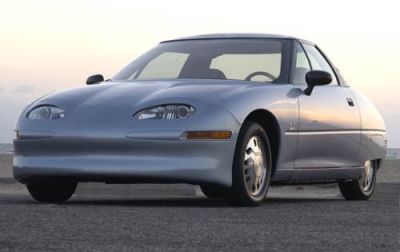
  Official sources say GM put almost two million dollars into the Sunraycer. The figure I heard was higher than that. The Sunraycer was a forerunner of the Impact. The ill-titled Impact was later renamed EV-1 and featured prominently in a movie called, "Who Killed The Electric Car".
  A system-by-system account of the Sunraycer was given by each of the principals: Peter Lissaman's shape, Al Cocconi's on drive train, Ray Morgan's body layout, Bart Hibbs material choices, etc. Several figures of note gave presentations on their subsystems. There was a systems engineer and a structures guy who did the "landing gear".
 Al Cocconi was an electronic genius, cut from the cloth of Apple's Steve Wozniack, but by rumor, a bit more temperamental. He had figured out that high voltage AC made for a more efficient use of a battery's limited energy compared to the low voltage DC that characterized golf-cart techology of the time. He used power MOSFET's, control circuitry and a host of cool tricks to produce a drive train that was extremely energy efficient. He later invented the first hybrid, part of which was in a trailer towed behind his car, and worked on aircraft that can stay aloft for days, but those are tales for another day.
 Ray Morgan was a down-to-earth engineer who talked about how Kevlar was better than Boron composites if you're in the ER after an experimental aircraft crash, because they "don't have to pick the boron splinters out of you one at a time". Ray could build stuff, in that enigmatic Mythbuster's sort of way. He talked about "Hot Shot" glue, a methacrylate glue that allowed you to put things together fast in a prototype and how you could pound the ends of fine tubing with a hammer so you could drill and fasten them together with a bolt. He is shown here shaking hands with Burt Rutan. Morgan is on the right.
 Bart Hibbs, son of Al Hibbs (the voice of the Voyager spacecraft), talked about Spectra vs. Kevlar. Spectra is stronger and lighter but had the disadvantage of "creep". This meant that a Spectra panel or component placed under sustained load would actually change shape over time and usually in a way you wouldn't want. The load dynamics of Spectra, from the slow responding viscoelastic ones, to the high speed stiff response encountered in parachute openings made it a questionable material in some sense. A generation of skydivers would discover this the hard way. Bart was smart like his dad and didn't miss details.
 Paul had a habit of only hiring CalTech Ph.D's for quality-control reasons, just as Honda liked Art Center College of Design people. Great if you went there, sad if you didn't. During the lectures Paul MacReady himself would chime in with the wonderful observations and questions. He reminded me of Richard Feynmann, and had most certainly attended lectures by Feynmann during his time at CalTech where he received a Ph.D. in aerospace engineering, or somethign akin to that. Paul had already distinguished himself on numerous occasions, the most notable of which was his winning the Kremer prize for the FIRST human-powered flight. Paul had worked on the wing of the DC-9 and asked himself, "What happens if you cover it with clear plastic sheeting instead of aluminum?" Paul had a knack with doing calculations that simplified things and figured out that a person on a bicycle produced sufficient power to keep such a wing aloft. The early prototype was secreted in a hanger with a landing gear of toy firetruck wheels. The final version hung in the Smithsonian.
 One thing I remember was Paul, or by title, Dr. MacReady was defining specific energy in an easy-to-apprehend way. A battery had enough energy to lift itself so many feet. Different battery types could then be ranked by how far they could lift themselves and indeed any energy storage or conversion scheme. The Sunraycer used batteries you could make in your kitchen with silver foil and potassium hydroxide. A similar battery was used on the moon vehicles. Light and powerful, the name of the game in electric cars.
 I immediately began mechanical design of the "module" and collecting the components for a prototype, sinking about $30,000 into credit card debt in the process. The fellow that I had originated the concept with parted ways with me, and I was left holding the bag and running out of funds, never finished the prototype. Coincidentally, there was almost no demand for electric cars. Later simulations would show that our "modular motors" concept was somewhat ill-fated from the start. If I had done these simulations at the beginning of the project, this would have been understood with considerably less pain. The mantra that emerged from the simulations was, "Electric? Half the Car at Twice the Price", due primarily to the range limitations of the lead-acid and nickel-cadmium battery technologies of the time.
Because of an exhausting 50 mile bike ride in the hot sun, I couldn't make it to Field Day on Saturday. I woke up late on Sunday, hoping to make some kind of belated appearance.
Just for fun, I started my HamTrack system at 9:47 am - a mashup of Google Earth, CW Skimmer, and C++ programs, glued together with some Unix tools, sed, grep, awk, along with the usual database fiddling and geolocating.
It is an end-to-end automated signal tracking system that translates RF morse code into pins on a map. So I left it running and headed over to the real Field Day, where, after catching up with my buds, I managed an impressive 2 contacts 15 minutes before the end of the event at 1 PM.
When I got home I discovered that 308 stations made 917 calls while I was gone, illustrated as pins in a map below. As in the 24 hour case, (previous blog), pins are colored by frequency, red for 6.9 MHz, blue for 7.1 MHz and spectral coloring in-between. My pin AE5CC is arbitrarily assigned red so I can find it in the sea of pins.
You will need the Google Earth browser plug-in to view the interactive map, and it takes a few seconds to load the data - about the time it takes to read this. If you don't use Google Earth, you're missing the best thing since sliced bread. - AE5CC


As more activities migrate to personal computers, system security becomes a greater concern. Threats to PC security include viruses, Trojans, worms, phishing schemes, buried processes and distracting scams. This note is Wintel-centric but applies to Mac and Linux boxes as well. This note addresses five categories of personal computing security.
A) Physical and Site Security - Routers and Locks
The web connection coming into your house is just another sewer pipe. Treat it accordingly. Use a router, lock it down.
1) Avoid connecting your DSL or cable modem directly to your computer. Instead,isolate your IP address by placing a router between you and the outside world. This also gives you additional ports that you can control access to and from. A router makes it difficult for an outsider to see your IP address (your internet phone number) or your MAC address (your hardware unique identifiers).
2) Install your router where you can see it. Control physical access to it.
3) Change your router name and password to something besides admin, admin.
4) Change your router IP address to something other than 192,168.1.1. Your browser will remember the new address. The router address can be reset by rebooting your router, but not without physical access.
5) The internet is NOT ham radio. Goodwill, Character and Integrity do not apply as in the licensed arts. Use 128-bit WEP or better encryption. Any device that connects to my router (the internet equivalent of a repeater) must have permission.
B) Soft Security - Anti-virus Software
You can do everything right and still get infected.
1) Install good anti-virus software. I currently use McAfee because it comes free with my Scottrade account and I can run three legal copies of it on other computers in the household. I have used Norton, but it costs too much, expires frequently and hogs system resources. I really like the free AVG software. It is excellent and they don't try to elbow out everything else. Computer Associates gives you a free trial and then makes uninstalling a total nightmare. This goes for several other packages. If a vendor doesn't provide a clean uninstaller, don't use them, because THEY are a virus.
2) Use firewall software. Insert exceptions for required sites and services like Echolink.
1) Don't open attachments from people you don't know.
2) Google gmail allows you to report items as spam. Use it.
3) Report fraud and phishing emails to their respective agencies including the ISP, Paypal, Ebay, FBI and Attorney General. Some ebay frauds have been really authentic looking. Check for spoof URL's before responding.
4) Keep a primary email account, and route all other email accounts to and
from it. This is for convenience as much as security.
D) Browser Security - Plug-ins and Spyware
Try Firefox 3.0 or later. It is multi-platform, open source, and accountable.
1) McAfee red lights troublesome web destinations, including bad ham radio destinations which are rare. I average 490 searches a month so this is quite handy. Other products also do this. Do not let anyone or anything obstruct your access to good information.
2) Don't use products (e.g. Real Video) that monopolize services such as video display and attempt to be the end all. If you give them your name and address you will get on "some list". Some lists go everywhere. Some programs will leave background processes running to report back to the mother ship. Besides invading your privacy these make browsing and computing slow.. AT&T Yahoo DSL is notorious about filling your PC with wasteful market-driven processes. They have destroyed the quality of many a newcomer's experience by marketing them to death. Too many choices.
3) Use Google Safe Search to avoid sites that are a frequent source of viruses. Your computer will get sick. It's karma.
4) Use Microsoft AntiSpyware. Forced by their own losses to develop this product, it works and its free. It is fairly lightweight, process-wise. Enable the auto-download, but require them to ask permission to install. Keep track of what they are adding or subtracting from your computer. Their track record requires them to be supervised.
5) Avoid illegal download sites for music, videos, or software. Your computer will get sick. More karma. Why steal? You will have to make a list like Earl.
E) Kid Security
"Little eyes, watch what you see..."
1) Put kid computers in a public place like the kitchen.
2) Check your kids browser history, chat, IM, Skype, often.
3) Facebook trumps myspace, but not by much. Check online friends and memberships often.
Conclusion
We live in the age of hot and cold running knowledge. Anything that obstructs access to this knowledge is a loss of freedom.
We also live in the wild west of the information age. Forewarned is forearmed.
 You Say Tomato
 I Say Potato
 The Edges of Lambda
 Butterfly Spectacular

